
20% of EU enterprises used AI in 2025. A year earlier, the number was 13.5%. In Croatia, adoption sits around 12%, below the EU average and far behind Denmark at 42% or Finland at 38%. For small businesses with 10 to 49 employees, the picture is worse: only 17% across the EU use AI in any form.
The numbers are climbing. The results are not. Only 26% of businesses adopting AI have developed the capabilities to generate measurable value from their investments. The rest are stuck in a loop: buying tools, running pilots, watching them stall, and starting over.
The problem is not the technology. The tools work. GPT-4, Claude, Gemini, open-source models: they are all good enough for most business tasks. The problem is strategy. Or more precisely, the absence of one. Eurostat data shows 71% of EU enterprises cite lack of expertise as the top barrier. Not cost. Not access. Knowing what to do with AI once you have it.
This post walks through how to build an AI strategy for a small business. Not which tools to pick. Not which vendor to choose. The work before any of those decisions: mapping your processes, identifying the right problems, running a focused pilot, and measuring whether it worked.
If you run a company with 10 to 200 employees and you feel pressure to "do something with AI," this is the starting point.
Why most AI projects fail before they start
The tool-first trap
The default approach looks like this. A founder reads about a new AI product. The team signs up for a trial. Someone builds a demo. It looks promising in a meeting. Six weeks later, nobody uses it. The subscription runs on autopilot.
This is the tool-first trap. You pick the technology before defining the problem it needs to solve. An MIT report from August 2025 found 95% of generative AI pilots at companies fail to show measurable financial returns within six months. The pattern repeats across industries, company sizes, and technology stacks.
Why does this happen? Because AI tools are horizontal. They do a bit of everything. Without a specific, well-defined business problem, the team applies the tool to vague use cases. "Speed up customer service." "Automate some reporting." "Help with content." Each one sounds reasonable. None of them has a clear baseline, a defined success metric, or a process to attach to.
The result: the tool sits in a tab. Occasionally someone uses it. Nobody measures the impact. After three months, the company moves on to the next shiny thing.
Data is the prerequisite nobody prepares
85% of AI projects fail due to poor data quality. Not model quality. Not prompt quality. Data quality.
Small businesses are particularly exposed here. Customer records live in a CRM, a spreadsheet, and someone's inbox. Inventory data sits in one system while pricing sits in another. Financial reports get compiled manually from three different sources every month.
When a business tries to layer AI on top of this, the model produces outputs based on bad inputs. The recommendations are wrong. The automations break. The team loses trust in the tool, and the project dies.
Cleaning and structuring data is not a glamorous task. It does not make for a compelling demo. But it is the prerequisite for every AI initiative. Skip it, and the pilot fails.
Budget allocation is backwards
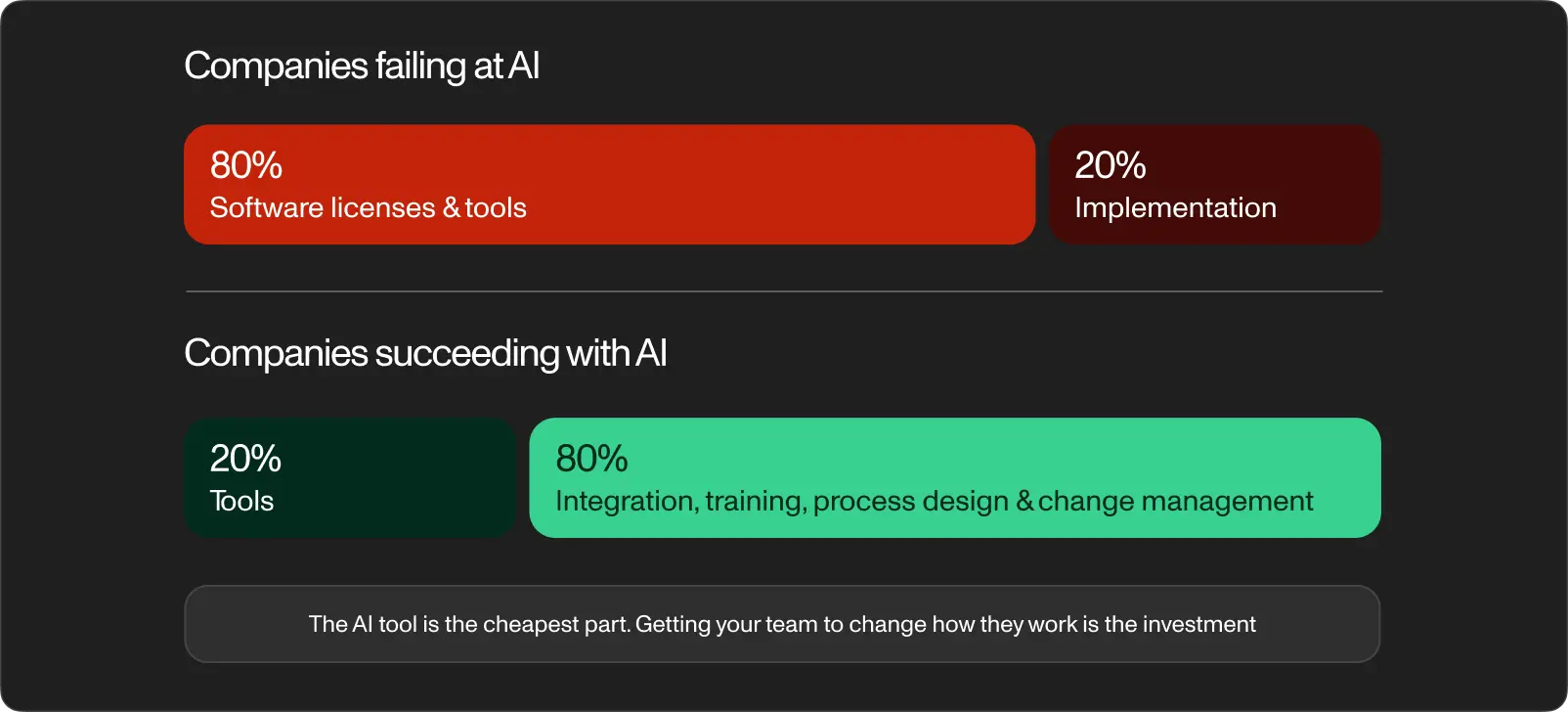
A study on AI implementation for small businesses found a revealing pattern in budget allocation. Companies failing at AI spend 80% of their budget on software licenses and 20% on implementation: process design, integration, training, and change management.
Companies succeeding with AI flip the ratio. 20% on tools. 80% on the work of integrating those tools into real workflows, training the team to use them, and adjusting processes around the new capabilities.
This is counterintuitive. The AI tool feels like the expensive part. In practice, it is the cheapest. A GPT-4 API subscription costs a few hundred dollars a month. Getting your team to change how they work costs time, patience, and deliberate effort.
Most small businesses underinvest in the hard part and overspend on the easy part.
A process-first AI strategy
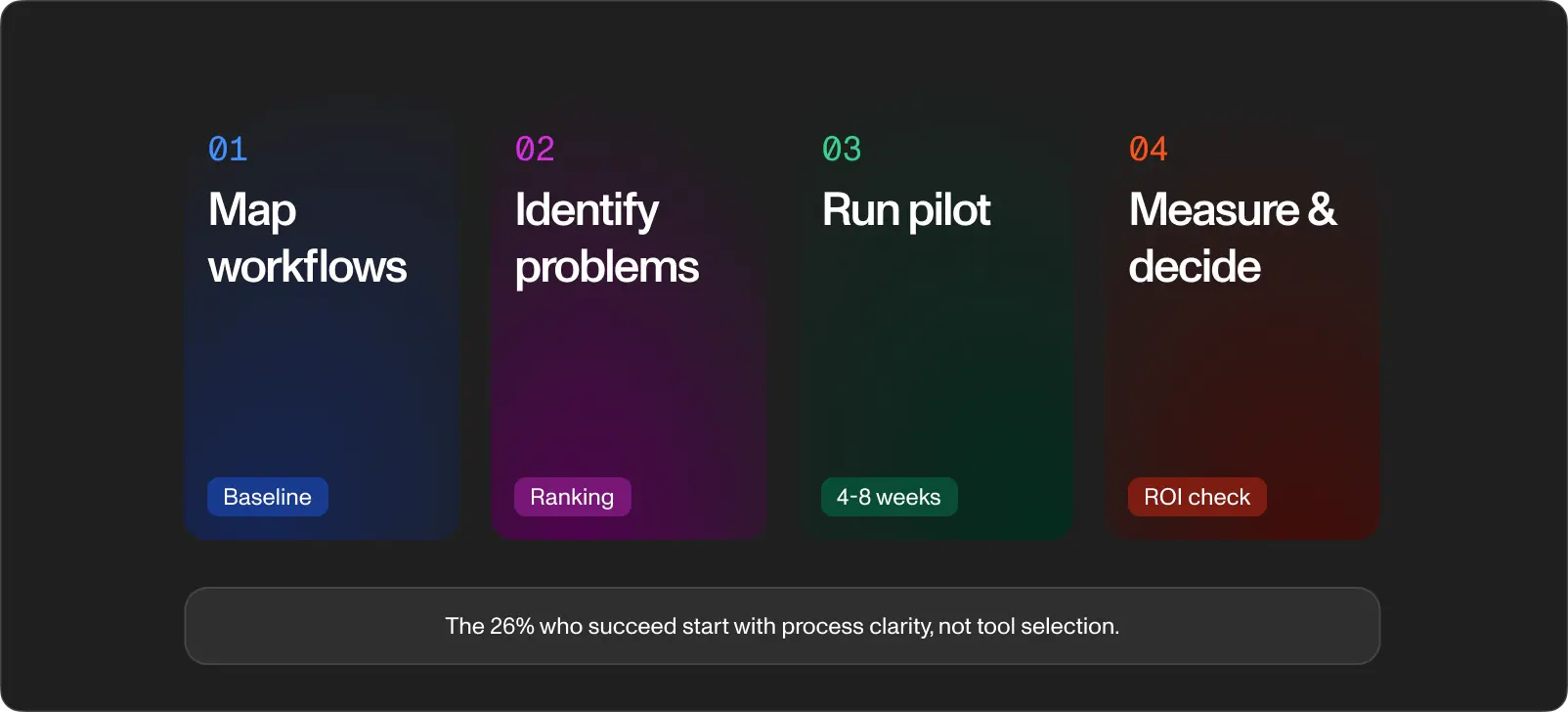
The alternative to the tool-first approach is a process-first approach. Map how your business operates today. Measure what is slow, expensive, or error-prone. Then decide where AI makes the biggest difference.
Step 1: map your workflows
Before evaluating any AI tool, document your core workflows end to end. Not at a high level. In detail.
Pick three to five processes costing the most time or money. For each one, write down:
- Who does the work (role, not person)
- What triggers the process
- Each step from start to finish
- Where data comes from and where it goes
- How long each step takes on average
- Where errors or delays happen most often
This exercise surfaces bottlenecks you did not know existed. A booking company might find 40% of its admin time goes to manually reconciling reservations across two systems. A service company might find technicians spending 90 minutes per day on paperwork instead of repairs.
The goal is a clear picture of your operations as they are today, not as you wish they were. This becomes your baseline.
Step 2: identify AI-ready problems
Not every bottleneck is an AI problem. Some need a better spreadsheet. Some need a process change with no technology involved. Some need custom software.
Look for three patterns.
The first is repetition. Data entry, document classification, email triage, report generation. Your support lead sorts 50 tickets a day into the same five buckets. Your accountant manually reconciles the same three systems every Friday. These are the low-hanging wins because the inputs are consistent and the judgment required is minimal.
The second is volume. Anomaly detection in financial records, predictive scheduling from historical demand, quality checks on incoming data. A person reviewing 10 invoices catches errors. A person reviewing 500 misses things. AI does not get tired at invoice number 487.
The third is structured output. You have a database of product specs and you need customer-facing descriptions. You have project management data and you need weekly status reports. You have CRM records and you need personalized outreach. When the format is predictable, AI produces reliable results at speed.
Problems lacking clear structure, depending on nuanced human judgment, or changing parameters constantly are poor candidates for automation. A strategy session with a client requires human thinking. Triaging 200 inbound support tickets into five categories does not.
Score each bottleneck from your workflow map against these criteria. Rank them by potential time saved and business impact. Your top two or three become your pilot candidates.
Step 3: run a focused pilot
A pilot is not a demo. It is a controlled test with real inputs, real users, and a defined success metric.
Pick one problem from your ranked list. The best pilot candidate has three qualities: it is painful enough for success to be noticeable, it is contained enough to execute in 4 to 8 weeks, and the data needed already exists in a usable format.
Set clear boundaries before you start. The scope is one process, one team, one measurable outcome. Nothing broader.
Measure the current state first. How long does this process take today? What is the error rate? How much does it cost per month? Write those numbers down. They become the benchmark everything gets compared against.
Pick one primary metric: time saved, errors reduced, cost cut, or throughput gained. Track it weekly. And set a hard deadline. Four to eight weeks. If you have not proven value in two months, the approach needs a rethink, not more time.
During the pilot, track the friction. Where does the AI output need human correction? Where does the integration break? What does the team complain about? These signals matter more than the headline metric because they tell you whether the solution scales.
Step 4: measure and decide
After the pilot, you have data. Compare the results against your baseline.
If the primary metric improved by 20% or more and the team used the tool without constant prompting, you have a scalable solution. Expand it.
If the metric improved but adoption was low, the problem is change management. Fix the training, simplify the interface, or reassign ownership.
If the metric did not improve, do not scale. Kill the pilot. Pick the next problem from your ranked list and try again.
This sounds harsh, but it saves money. Deloitte reports only 25% of AI initiatives deliver expected ROI, and only 16% scale enterprise-wide. The companies succeeding are the ones willing to shut down what does not work and redirect resources.
The expected ROI timeline for AI is longer than most technology investments. Only 6% of companies report payback within one year. Plan for 12 to 18 months from pilot to full operational impact.
How we approach this at Workspace
We run product discovery workshops with clients before writing a single line of code. The format varies by project, but the principle stays the same: map the real operations first, then decide what to build.
A typical workshop starts with an online kickoff where we align on context, confirm participants, and collect existing documentation. The on-site sessions bring our project manager, software architect, business analyst, and product designer into the same room with the client's process owners, department leads, and day-to-day users. We map workflows by domain, define roles and access levels, document data relationships and business rules, flag exceptions and edge cases, and review every existing tool and integration point. By the end, the client has a full software requirements specification: process maps, functional and non-functional requirements, a defined permission model, an integration list, acceptance criteria, and a prioritized scope for phase 1.
The workshop separates the "what should we build" question from the "how should we build it" question. Clients often arrive with a solution in mind. A shipyard wants "an operations platform." A public institution wants "a time tracking system." The workshop forces everyone to get specific: which handoffs break down, where data gets duplicated, what approvals slow the process, which edge cases the current system ignores.
DES is a good example. A public institution in Split wanted to replace manual clock-in processes. Sounds simple. It was not. The discovery work revealed integration requirements with Pantheon ERP, contactless NFC card workflows, shift-based rules across multiple departments, and access control logic nobody had written down. Without the process mapping, we would have built the wrong system. With it, we built one covering every edge case the old paper process had been hiding for years.
Pro Desk followed a different path to the same conclusion. A sports facility management platform with four distinct user types: admins, facility owners, trainers, and members. During the discovery sessions, biometric authentication requirements surfaced for the first time. Nobody on the client side had documented them. Each role interacts with the system differently: trainers manage schedules, members check in, owners review financials, admins control everything. Mapping those interactions before writing code saved weeks of rework and a redesign.
Serwizz is our own AI-powered CMMS product. We built it for maintenance and service teams across industries: marine, facility management, manufacturing, hospitality. And we started the exact same way we start client projects. Months of mapping how maintenance teams operate: what breaks, how work orders flow between technicians and managers, where information gets lost, what reporting looks like when it works and when it does not.
The AI layer came after the process layer was solid. Serwizz now includes AI features for natural language task management, contextual guidance inside the app, and document summarization. A technician asks "Convert this week's tickets at ACI Marina Split into work orders" and the system handles it. A supervisor asks "How do I set up recurring maintenance every 3 months?" and gets a step-by-step answer with the right screen already highlighted. These features work because the underlying data model is clean, structured, and built on real workflows. AI on top of messy data produces noise. AI on top of mapped processes produces speed.
Every estimate we produce uses AI-assisted analysis of historical time-tracking data from all past projects. Every task our team has worked on is logged with complexity, duration, and project context. When a new project comes in, we run it against this database. The result is an estimate grounded in real delivery data, not guesswork.
What comes next
An AI strategy for a small business starts with process clarity, not tool selection. Map how work flows through your company today. Measure what is slow. Identify where AI fits. Run one pilot. Measure the result.
74% of AI projects fail to deliver value. The difference between the 74% and the 26% is not better tools. It is better preparation: cleaner data, tighter problem definitions, and realistic timelines.
If you want help mapping your workflows and identifying where AI delivers the highest return, reach out to book a discovery session. We run workshops designed to move you from "we should do something with AI" to a concrete plan with defined outcomes and a realistic budget.