

Most teams adopt AI assistants for one-off tasks. Draft an email. Summarize a document. Generate a code snippet. The assistant responds, the team moves on, and the next person starts from scratch with a new prompt.
This creates a hidden cost. Every prompt is written once and thrown away. Quality varies between team members. The knowledge your best people carry in their heads stays locked in individual conversations, not shared across the organization.
Claude skills fix this. A skill is a folder with a set of written instructions, context, and rules for a specific job. You write it once. After, Claude picks it up on its own whenever someone on the team asks for something related. No copy-pasting prompts, no tribal knowledge trapped in someone's clipboard. The whole team gets the same quality output.
This post breaks down how Claude skills work, when to use them, and how to build one for your team. Whether you run a five-person team or a fifty-person product company, the principles are the same: package what you know, and let the AI execute it.
The problem with ad hoc prompting
The copy-paste wall
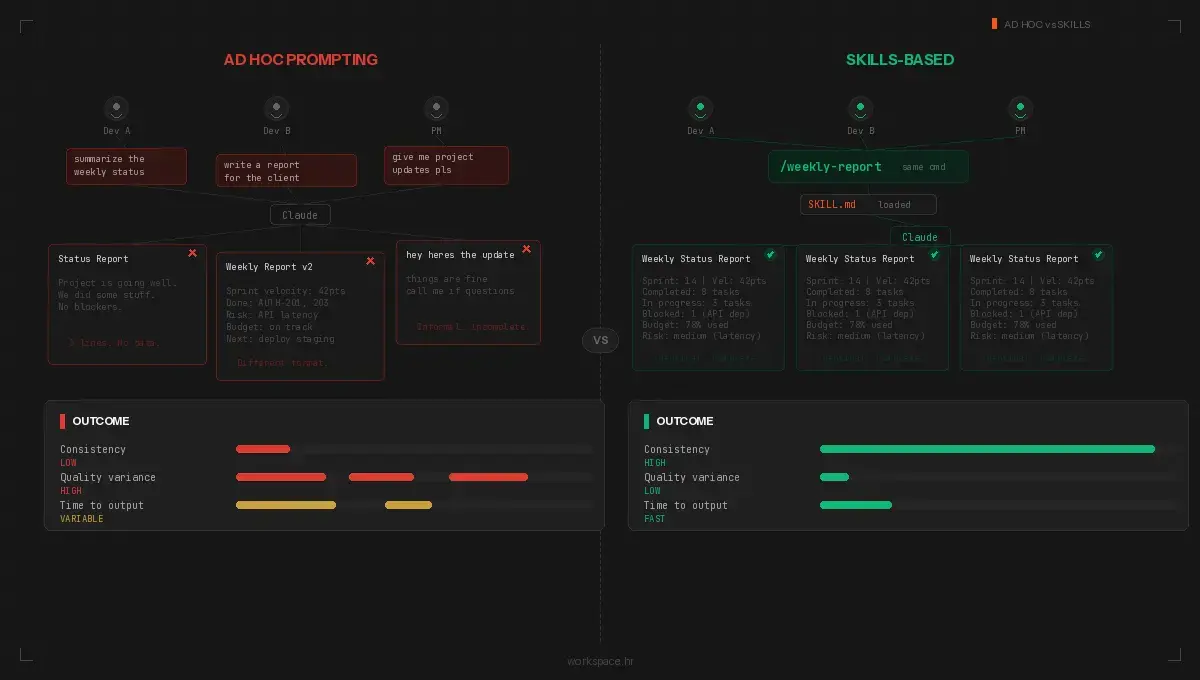
Teams without standardized AI workflows hit the same wall. One developer writes a solid prompt for code review. Another writes a vague one. The marketing lead gets consistent blog outlines because she spent an hour fine-tuning her prompt. The new hire gets messy results because he copied a stripped-down version from Slack.
The 2025 Stack Overflow survey puts the number at 41% of developers using Claude as their go-to AI assistant. A year earlier, it was 18%. The tools are spreading fast. How teams use them has not kept up. Sourcegraph ran a study showing developers burn more time correcting and re-prompting than they spent writing the original prompt.
This is a workflow problem, not a capability problem.
Tribal knowledge stays tribal
Your best team members have mental models for how work should get done. The senior developer knows the exact deployment checklist. The project manager knows the right questions to ask during a discovery workshop. The designer knows the review criteria for UI consistency.
When these people leave, the knowledge leaves with them. Worse, even while they are still on the team, their expertise lives in their heads. It does not transfer to junior team members or to the AI assistant they all use daily.
The compound cost of inconsistency
Inconsistent AI outputs create downstream problems nobody tracks at first. Code reviews miss different things depending on who prompted the review. Client reports vary in structure and depth. Onboarding documents read differently every time someone generates one.
Each inconsistency is small on its own. The compound effect is large. Rework, confusion, missed standards, wasted time. We tracked this internally at Workspace. On a typical day, one of our developers was spending 10-20 minutes per task re-explaining project context and fixing AI output. Over eight tasks, two or more hours gone. Multiply by five team members and the waste is hard to ignore.
Build skills, not prompts
Claude skills solve the repetition problem by packaging knowledge, standards, and workflow instructions into a structured format Claude loads automatically.
What a skill looks like
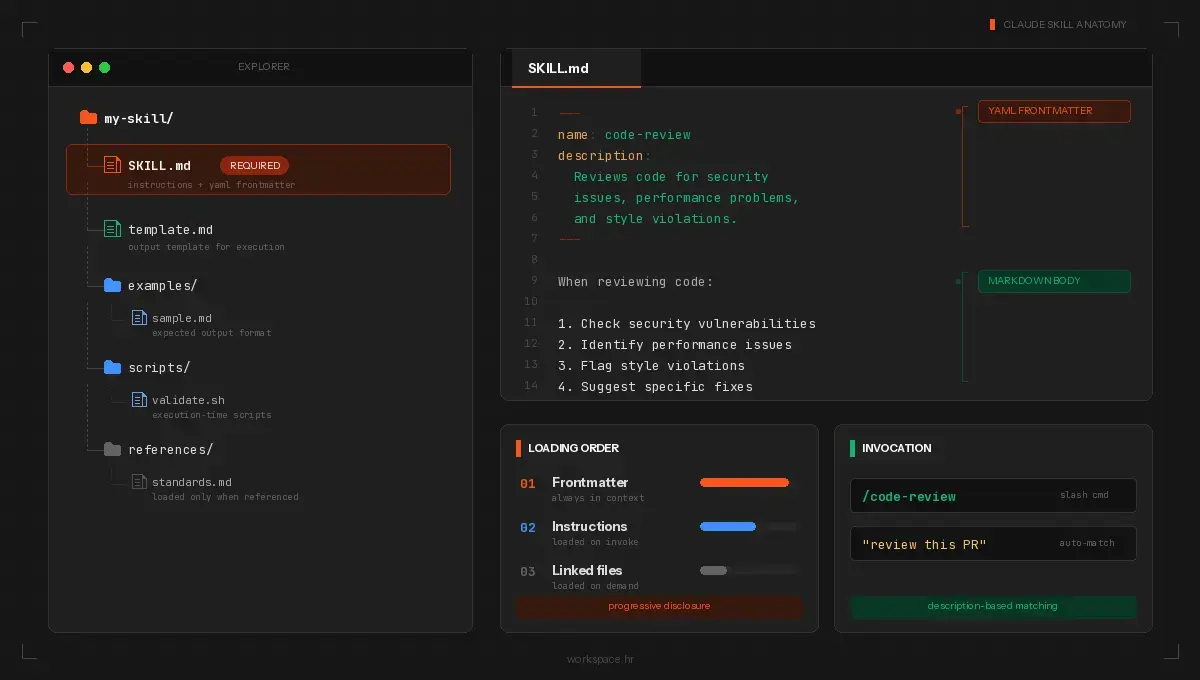
A skill is a folder with one required file: SKILL.md. This file has two parts. YAML frontmatter at the top defines metadata: the skill name and a description. The markdown body below contains the instructions Claude follows when the skill runs.
Here is a minimal example:
---
name: code-review
description: Reviews pull requests for security issues, performance
  problems, and style violations. Use when reviewing code changes.
---

When reviewing code:

1. Check for security vulnerabilities first
2. Identify performance bottlenecks
3. Flag style violations against our coding standards
4. Suggest specific fixes for each issue found

Reference our coding standards in [standards.md](standards.md).
The description field is what makes automatic triggering work. Claude reads every available skill description and matches it against your request. If you ask "review this pull request," Claude loads the code-review skill and follows its instructions. You also invoke it directly with /code-review.
Beyond the SKILL.md, a skill folder supports optional components:
- Scripts/: Executable code (Python, Bash) Claude runs during execution
- References/: Documentation, style guides, or example files Claude reads when the instructions say to
- Assets/: Templates, fonts, icons, or other output resources
The frontmatter controls behavior beyond name and description. Set disable-model-invocation: true for skills with side effects, like deployments, so Claude does not auto-trigger them. Use allowed-tools to restrict which tools the skill uses. A read-only research skill should not have write access.
Three categories of skills
Document and asset creation. These cover the outputs your team produces over and over: PDFs, proposals, slide decks, spreadsheets, code components. You bundle a template, a style guide, and a quality checklist into one skill folder. No external tools needed. Claude ships with built-in skills for PowerPoint, Excel, Word, and PDF creation. Your own skills follow the same pattern for domain-specific outputs.
Workflow automation. Think about the jobs where your team follows the same steps every time. A workflow skill strings the whole chain together and Claude moves through it without stopping for directions. The built-in /batch skill, for example, decomposes large codebase changes into parallel units, spawns agents for each, and opens pull requests automatically. Your own workflow skills do the same for your domain: research, draft, review, package.
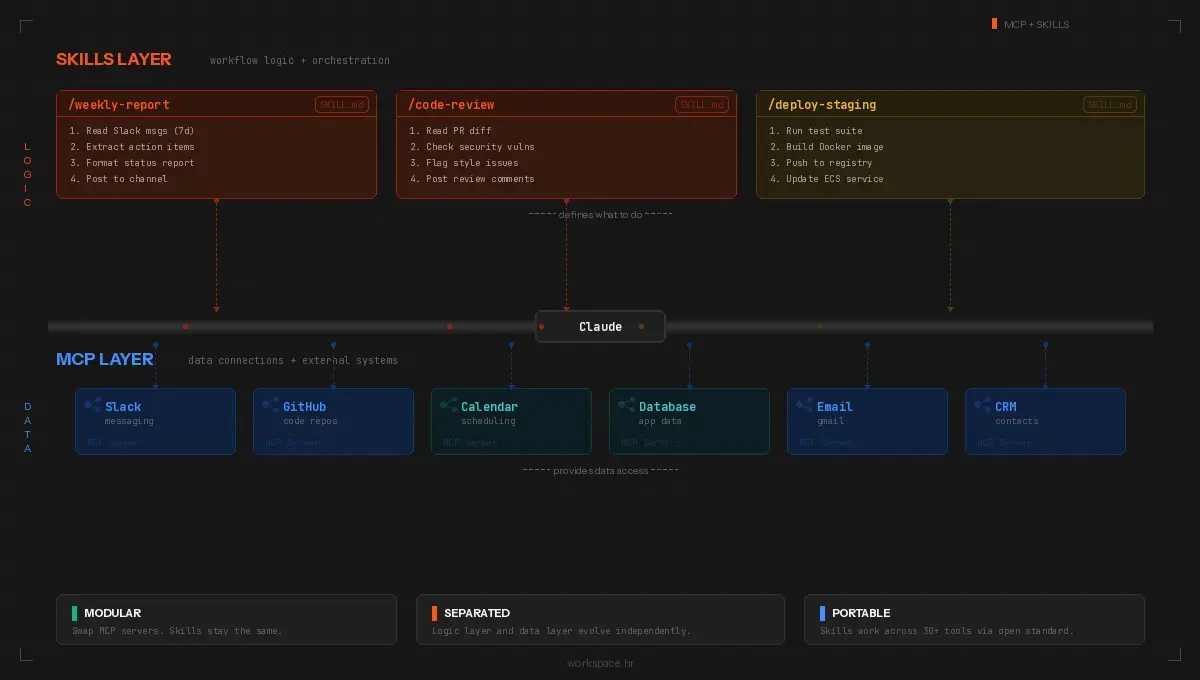
MCP enhancement. MCP (Model Context Protocol) gives Claude access to external systems: Slack, Google Calendar, GitHub, CRMs, databases, APIs. A skill layered on top of MCP adds domain logic to raw tool access. A bug-filing skill reads monitoring data through MCP, creates structured tickets with the right labels and priority, and assigns them based on your rotation rules.
Skills and MCP are complementary. MCP provides the connections. Skills provide the logic. When you change your project management tool, you swap the MCP server. The skill stays the same. When you update your reporting format, you edit the skill. The connection stays the same.
How to build your first skill
Start with a task your team repeats weekly. Something with clear inputs and predictable outputs. A project status report, a PR review checklist, a client email digest.
Write the instructions the way you would explain the process to a new colleague on their first day. Spell out each step, the order, and what the final deliverable looks like. Note what to check for, what to skip, and where to look up reference material. Do not assume context. The skill file has none until you give it.
The SKILL.md body needs to cover:
- What the skill does, stated plainly in the opening paragraph
- What inputs to gather from the user before starting
- The exact workflow, step by step, with decision points noted
- What the finished output looks like (format, length, structure)
- What to do when something goes wrong, because it will
Drop your templates, style guides, and example outputs into the References/ folder. This is the part most people skip, and it makes a big difference. Claude reads these files when the skill runs and uses them as anchors for its output.
Before sharing, test the skill three or four times with different inputs. Did the output stay consistent? Did Claude trigger it when you did not intend it to? If the description is too broad, the skill fires on unrelated requests. If the instructions are too loose, the output drifts between runs. Tighten both until you trust the result.
Design principles worth following
Progressive disclosure. Claude loads skill information in three layers. Frontmatter descriptions are always in context. Full instructions load only when invoked. Supporting files load only when referenced. This keeps the context window clean. Put core logic in SKILL.md. Move detailed references, example outputs, and templates to their own files.
Composability. Each skill should do one job and work alongside other skills without conflict. A code-review skill and a deployment skill should not interfere with each other.
Portability. The Agent Skills standard works across Claude Code, Cursor, VS Code Copilot, Gemini CLI, and other tools. Build your skills to the standard format and they move with you.
How we use skills at Workspace
We have been building and refining Claude skills at Workspace for over a year now. Here is where they make the biggest difference for us.
Client proposals. Before skills, the junior developer's proposal looked different from the senior developer's. We built a creation skill with our document templates and formatting rules baked in. Now every proposal comes out looking the same. It took a few iterations to get the instructions right, but the payoff shows up on every new project.
Blog content. We have a workflow skill for posts like this one. It runs SEO research, writes the draft, reviews it against our banned-words list and tone rules, then produces the finished file with metadata attached. What used to take four hours finishes in under 30 minutes.
Outbound sales. For Serwizz, our CMMS product for the marine sector, we built an MCP skill pulling leads from Apollo, qualifying each one against our ideal customer criteria, grabbing company info and recent LinkedIn posts, then writing a personalized first email. Five tools, one skill, under two minutes per batch.
Charter booking logic. We work with multiple clients in the yacht charter industry: Boat4You, Europe Yachts, Sailweek. We built a domain skill with all the charter rules baked in: seven-day minimum stays in peak season, Saturday-to-Saturday changeover logic, split payment schedules, cancellation tiers by date range. A new developer on the team does not need to learn any of this from scratch. The skill already knows.
Cross-client portability. The booking patterns we refined on Boat4You gave us a head start with Catamaran Charter Italy, a fleet of 140+ boats with their own quirks but the same underlying reservation logic. The service report structure from Capax, where technicians track refit work on yachts, fed directly into features we built for Serwizz. Each project makes the next one tighter.
The knowledge also compounds over time. We started working with Sailweek in 2022. When Ante asked us to redesign their booking flow this year, we opened the same skill we wrote four years ago. Updated it, yes. But we did not rebuild context from scratch. Sailweek pays us to move forward, not to relearn what we figured out in year one.
What comes next
Claude skills turn tribal knowledge into team infrastructure. The workflows your best people run manually become automated, consistent, and shareable. Pick one repeatable workflow. Write the SKILL.md. Test it. Share it. Then build the next one.
The numbers back this up. 41% of all code written in 2025 was AI-generated or AI-assisted. Claude Code reached $1 billion in annualized revenue within six months of launch. The MCP ecosystem processes 97 million monthly SDK downloads across 10,000 active servers. The infrastructure is mature. The question is whether your team has structured workflows to make the most of it.
If you want help identifying which workflows to automate first, or you want to see how skills work in the context of a real project, reach out to our team. We run discovery workshops where we map your processes, identify skill candidates, and build a plan for implementation.