
On May 11, 2026, at 19:22 UTC, an attacker pushed the first of 84 malicious package versions to npm. By 19:26, all of them were live. Six minutes. 42 packages across the @tanstack namespace, every one of them a household name in modern React codebases.
Six weeks earlier, on March 30, a different attacker published two compromised versions of axios, a package with over 100 million weekly downloads. Both versions installed a remote access trojan on every machine that pulled them.
If you ran npm install anywhere near those windows, you might already be infected. The malware does not ask. It just runs.
Most posts about supply chain attacks treat them as isolated incidents. This is not one of those posts. What happened in March and May of this year is the same story told twice, with different attack vectors and slightly different victims, and it confirms what security researchers have been arguing since the Shai-Hulud worm broke loose in September 2025. The era when you could type npm install and think about something else is over.
This post walks through what actually happened in both attacks, what makes 2026 different from previous npm compromises, and what a frontend developer can do about it without quitting JavaScript.
What happened
Axios, March 30: the credential theft route
The attack on axios is the classic playbook executed cleanly. Attackers compromised the npm credentials of the package's primary maintainer. With those credentials in hand, they published two malicious versions: 1.14.1 and 0.30.4. Both versions contained a remote access trojan that installed itself on macOS, Windows, and Linux.
Microsoft attributed the operation to Sapphire Sleet, a North Korean state actor with a documented history of supply chain operations targeting developers. The choice of axios was not accidental. With more than 100 million weekly downloads, the package is statistically present in most React, Vue, and Node.js projects shipped today.
The two malicious versions stayed live for several hours before npm pulled them. That window was enough. Every CI pipeline configured to pull the latest minor or patch version, which is the default when package.json uses ^1.14.0, installed the RAT silently and continued the build. Most teams never knew it happened.
TanStack, May 11: the GitHub Actions route
The TanStack attack is the one that should make you uncomfortable. There was no credential theft. The attacker never logged in as anyone.
What they did was exploit a known weakness in GitHub Actions called pull_request_target. The flow looks like this: the attacker forked the TanStack repository, opened a pull request, and immediately closed it. That sequence (open, close) was enough to trigger a publishing workflow that ran with the main repository's permissions. From there the attacker poisoned a file in the CI cache, stole the npm publish token from the workflow environment, and started pushing.
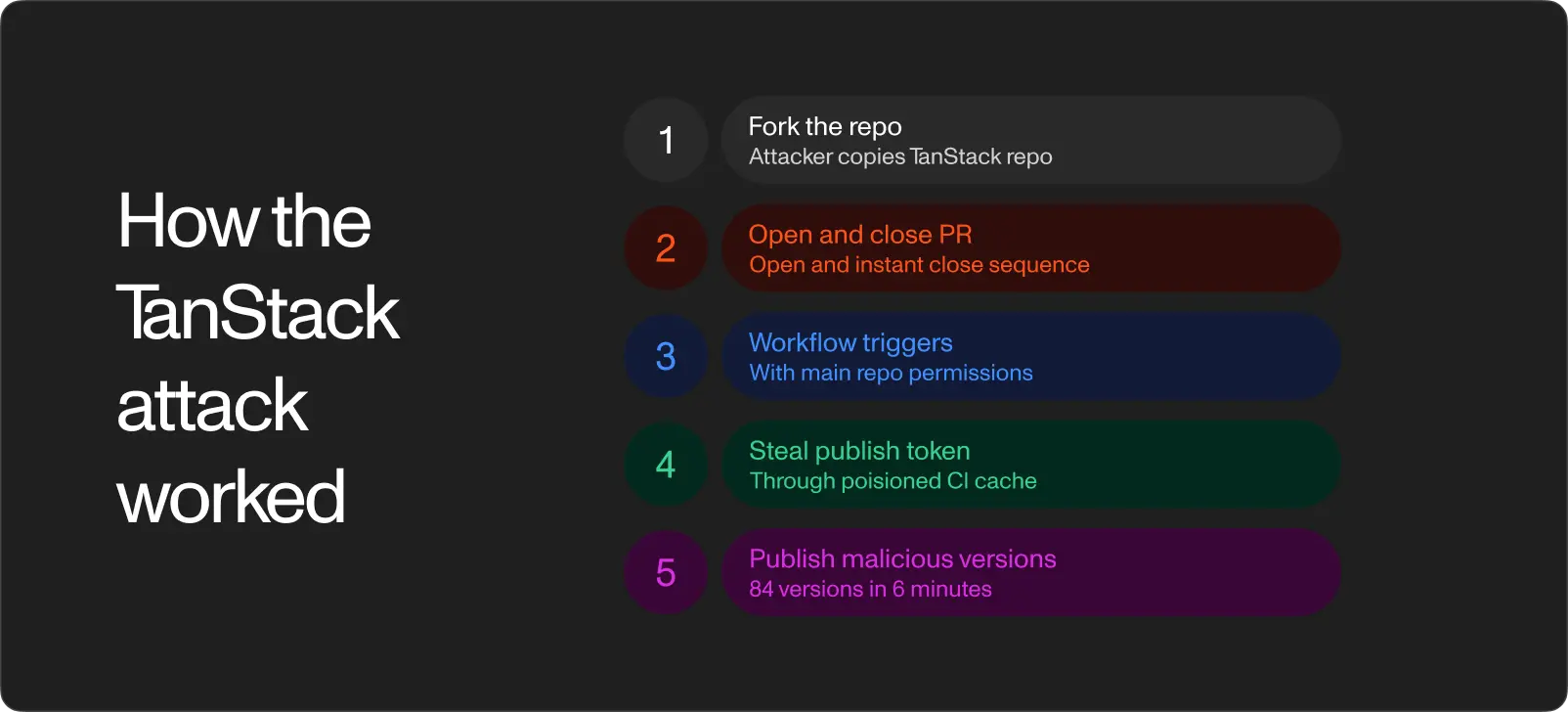
84 malicious versions across 42 @tanstack packages went live in six minutes. The attack did not stop at TanStack. The same worm laterally moved to Mistral AI, UiPath, OpenSearch, and a long tail of around 160 packages in total. PyPI was also hit, which means the attack crossed ecosystems.
Three details from the TanStack writeup stay with you.
The malware embedded itself in VS Code and Claude Code. Once installed, the worm hooked into the editor's startup. Even after you uninstalled the infected package, the worm would run every time you opened the editor. Cleaning the dependency was not cleaning the infection.
Dead man's switch. A background process checked every sixty seconds whether the stolen GitHub token was still valid. The moment the token expired or was revoked, the process executed a destructive payload against the root directory. Detection meant data loss.
Forged AI commits. The malware created commits signed with the Claude Code GitHub app identity. In repositories where commits from AI tools are normal, the malicious commits blended in. A reviewer scanning the commit log for unusual signers would have seen nothing unusual.
Why this is different from npm attacks five years ago
Supply chain attacks on npm are not new. Event-stream in 2018, ua-parser-js in 2021, the colors and faker sabotage in 2022. The genre has a long history. What changed in late 2025 is that the attacks started replicating themselves. The Shai-Hulud worm, which broke containment in September of that year, was the first npm payload that actively spread by stealing tokens from infected developer machines and republishing itself through whatever publish credentials it found. Palo Alto's Unit 42 has been tracking the family continuously since. A variant they call Mini Shai-Hulud was active as recently as this month.
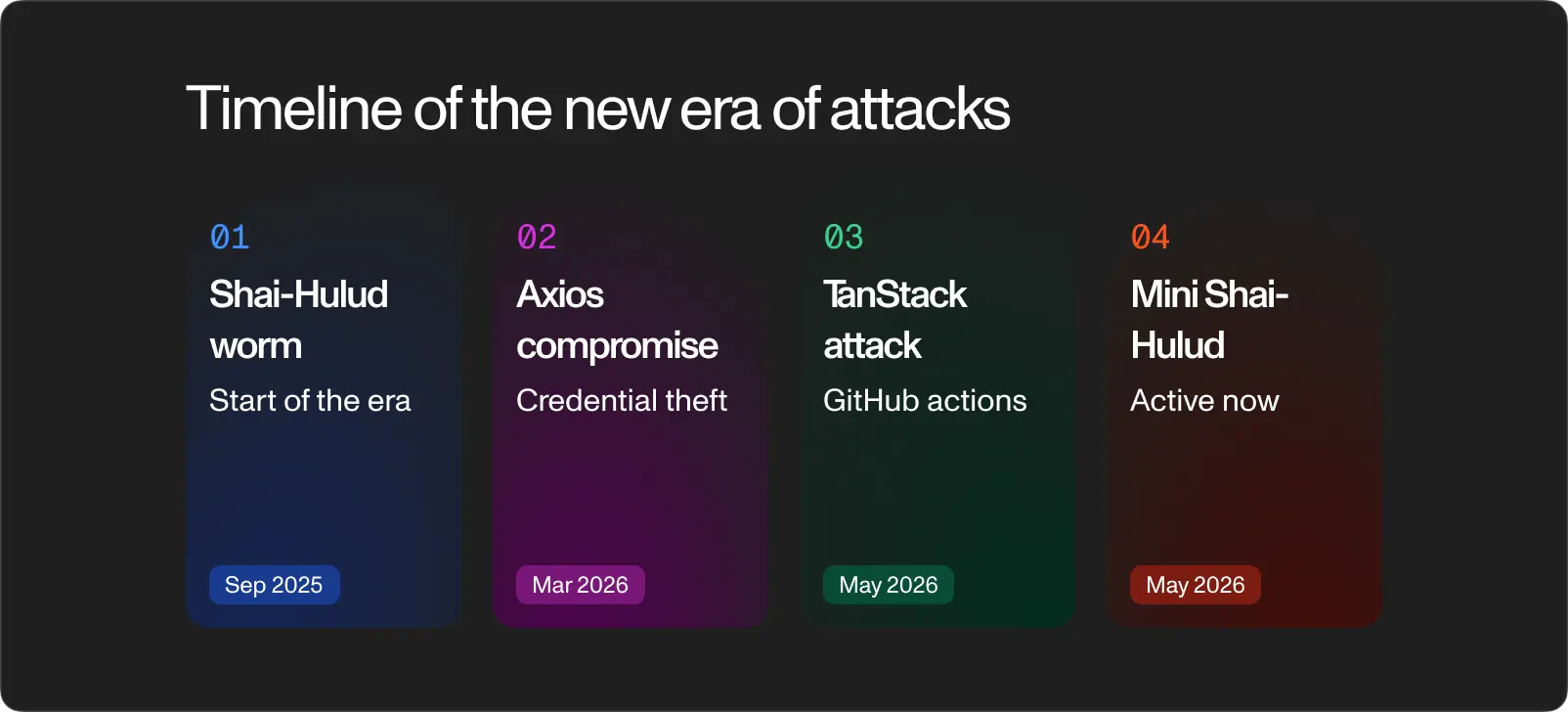
That continuity is the first thing that is different. We are no longer dealing with discrete incidents that get cleaned up. We are dealing with a persistent threat that mutates between campaigns.
The second thing that is different is the target surface. Developers used to be at risk because their machines stored production credentials. Now developers are at risk because their machines run AI assistants with broad filesystem access, GitHub apps that can push code on their behalf, and editors that automatically execute extensions on startup. The TanStack worm went after every one of those layers. Each one is a new place a payload can hide.
The third thing, and this is the part that matters most for how you read commits going forward, is that the line between "my commit" and "malware commit" is now blurry. When an attacker can forge a Claude Code signature on a commit, the visible markers reviewers used to rely on stop being reliable. AI tools did not create this problem, but they widened the surface where impersonation can happen without anyone noticing.
None of this means JavaScript is finished or that you should rewrite your stack in Rust. It does mean that the assumption that npm is a passive utility, where you point it at a name and it returns a package, is no longer safe. The registry is now part of the threat model.
What a frontend developer can actually do
The good news is that most of what works is mechanical, not heroic. There are four moves worth making this week.
Fix your version pinning
Open any package.json written in the last five years and you'll see something like this:
{
  "dependencies": {
    "axios": "^1.14.0"
  }
}
The caret prefix means "install 1.14.0 or any later minor or patch version." It was designed for a world where minor versions were safe. In a world where minor versions can be malicious, the caret is the reason the Axios attack reached as many machines as it did. Teams pinned to ^1.14.0 automatically pulled 1.14.1 the moment it appeared.
Removing the caret, which means pinning to exact versions like 1.14.0, is annoying because it forces you to take updates manually. It is also the single biggest change you can make. Updates become a decision, not a default.
Stop ignoring your lockfile
If package-lock.json is in your .gitignore, take it out. Commit it. The lockfile records the exact resolved versions of every transitive dependency in your tree, not just the top-level ones you wrote down. Without it, every fresh install on a new machine is a roll of the dice.
npm audit is useful as a starting point but does not catch attacks in real time. Both the Axios and TanStack payloads were detected by external researchers, not by npm's own scanners. Treat audit output as the floor of what you check, not the ceiling.
Move to pnpm 10 or later
This is the structural fix. Pnpm has spent the last year shipping three features that map directly onto the attack patterns we have been seeing.
# .npmrc
minimum-release-age=86400
allow-non-npm-registry=false
ignore-scripts=true
The first setting refuses to install any package version published less than 24 hours ago. Most malicious versions are detected and pulled within that window, which means waiting a day is a remarkably effective filter for almost no cost.
The second setting blocks installation of anything that did not come through the real npm registry. Exotic subdependencies (packages tagged to install from a tarball URL, a git repository, or an external mirror) are a common payload delivery vector. Refuse them by default.
The third setting blocks install scripts from running automatically. Many malicious packages rely on postinstall hooks to execute their payload. With ignore-scripts=true, you have to explicitly approve each package whose scripts you want to allow. The first time you turn this on you will find that a surprising number of packages in your tree wanted to run code on install. That is the point.
Wire up monitoring
Socket.dev, Snyk, and GitHub Dependabot all alert on known compromises faster than npm does. Pick one and put it in your CI. None of them are perfect, but any of them would have flagged both the Axios and TanStack versions within hours of disclosure. A few hours is the difference between a clean rebuild and a forensic investigation.
Check whether you were already exposed
If you have shipped anything since March, this is the part to do before you close the tab.
For the Axios attack, search your lockfiles for the compromised versions:
grep -rE "axios.*1\.14\.1|axios.*0\.30\.4" package-lock.json
If either string returns a hit, that machine pulled the malicious version. Treat it as compromised: rotate any credentials that lived on it, including GitHub and npm tokens, and reinstall the OS if it stored anything sensitive.
For the TanStack attack, the relevant window is narrower. Any @tanstack/* package installed between 19:20 and 19:26 UTC on May 11, 2026 is suspect. Check your CI logs for installs in that window, and check your lockfiles for @tanstack versions that match the published malicious set. The full list of compromised versions is in the Rescana writeup linked below.
If nothing matches, you probably got lucky. The thing about luck is that it is not a strategy.