
If every company buys the same AI tools, the same models and the same chat on the same day, the advantage comes from what the tools don't know: your processes and your data. Our founder Ivan Lovrić asked this question at two talks on AI in business last week and again in two interviews:
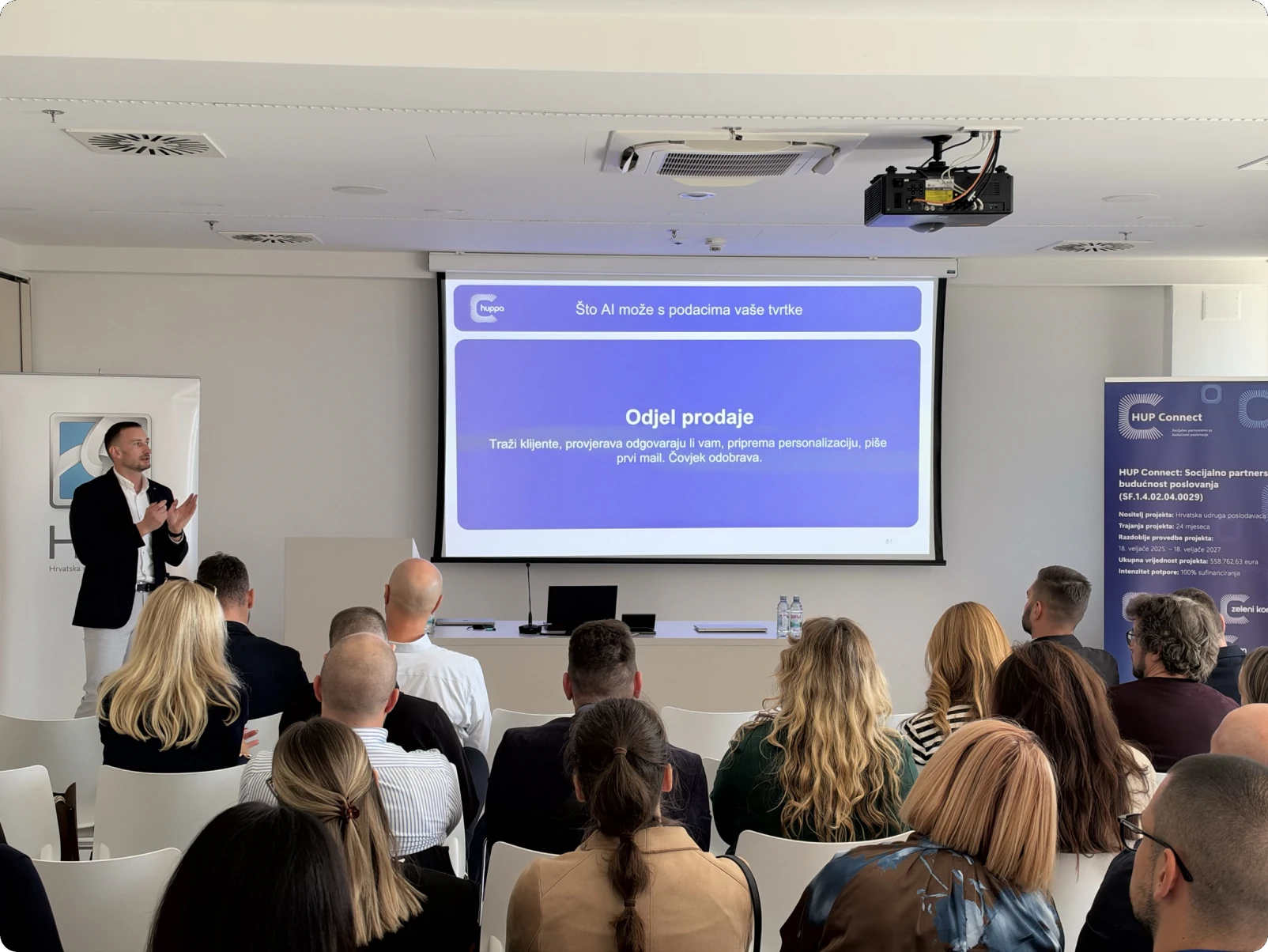
- HUP masterclass, 27.10.2026 at Tehnološki park Split: "From digitalising business processes to applying artificial intelligence", a two-hour talk for owners, directors and managers of small and mid-sized companies, organised by the HUP Business Academy and HUP's regional office in Split.
- TV Dalmacija, 29.10.2026, before the meetup started: a short interview on where AI helps companies today.
- ML/AI Split meetup, 29.10.2026 at the Digitalna Dalmacija Tech Hub: "AI in everyday business: from digitalisation to automation", the first edition of the meetup after a longer break, organised by Digitalna Dalmacija, in a full hall.
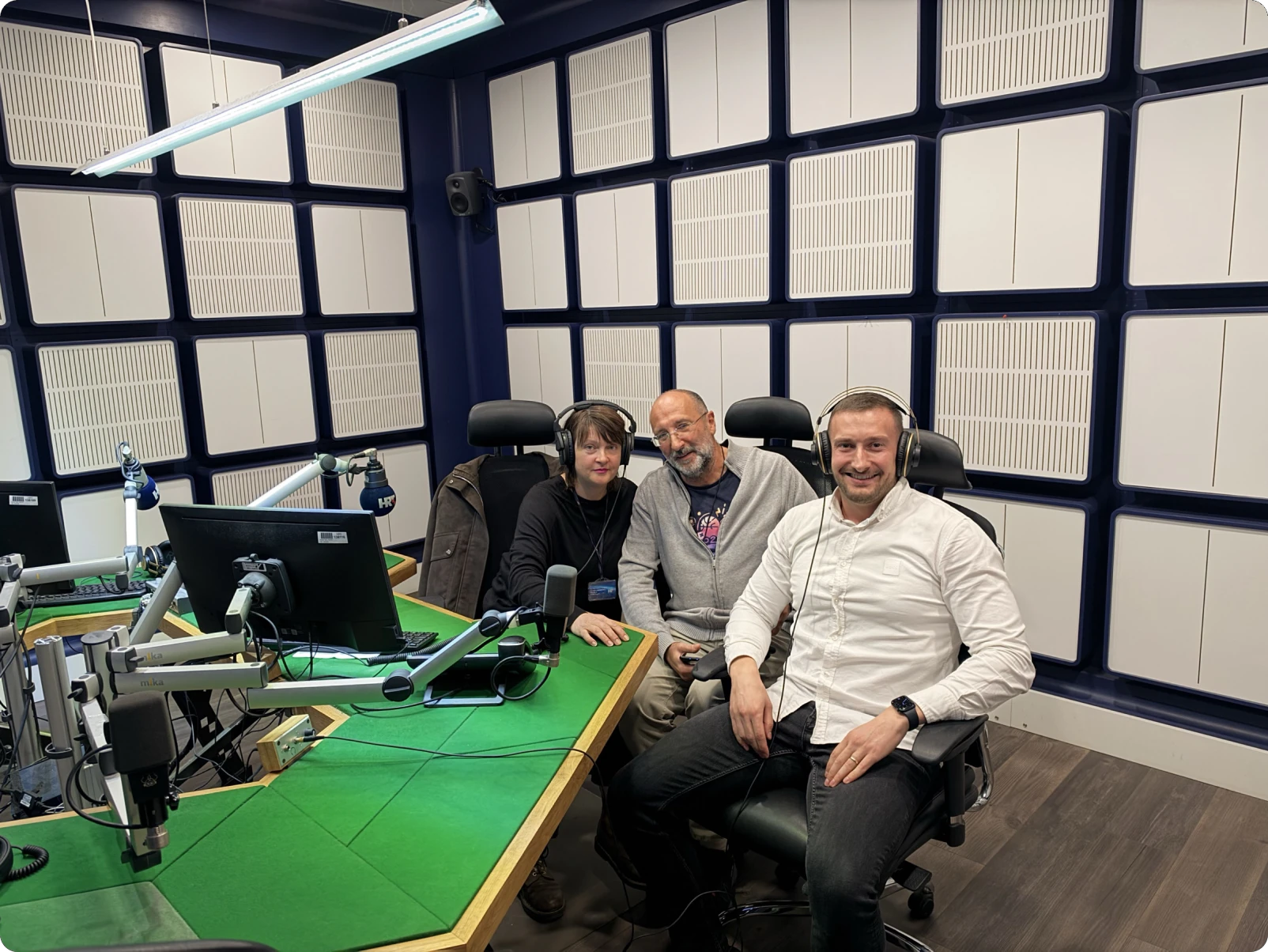
- HRT Radio Split, 2.11.2026, live on air with hosts Magdalena Šipić and Zoran Vukičević: where AI helps companies in everyday work, and why the advantage comes from a company's own processes and data.
The audiences were different, owners and directors of small and mid-sized companies at HUP, developers and AI practitioners at the meetup, and viewers and listeners who run a business or work in one. The questions were the same: what to digitalise first, whether to buy software or build it, and what AI does with a company's own data. This post follows the talk in the order we gave it, with the examples from real projects and the parts where those projects got stuck.
Paper and Excel: where most companies are today
Most companies start from the same place, and nobody in the room was late. A customer calls, someone writes the request on paper or in a notebook, a technician takes the printed work order to the site and fills it in by hand, and a day or a week later someone in the office copies it into a spreadsheet, from which a third person builds the invoice. Photos from the site travel over WhatsApp, agreements with the customer travel by phone, and the record of the work done lives in the heads of two or three people.
It works while you're small
With five people in one room, this works, because everyone knows everything and when something stalls, someone remembers. At 20 or 30 people across several locations, the same way of working produces delays, lost papers, invoices going out weeks after the job, and phone calls whose only purpose is to find out where a job got stuck.
Excel is not the problem. It's a good tool for calculation, analysis and testing an idea, and plenty of companies will still use it in 10 years. The problem starts when a spreadsheet quietly becomes the main source of data for the whole company, edited by several people at once, with nobody sure which version is the latest, where one wrong formula or one shifted row changes a whole schedule or a whole offer, and where the spreadsheet never warns anyone about a service due.
A process nobody designed
When we mapped the path from first call to bookkeeping with one service company with field technicians, we counted 24 steps. The work order was printed together with the delivery note, material and hours went on paper and then again into each technician's own notebook, in case of a later check, the delivery note passed three sign-offs, the report to the regulator was added up by hand from delivery notes, and equipment deadlines and vehicle registrations were tracked from memory.
Nobody in the company works badly, and every step had a good reason. Someone made a mistake once, so another sign-off was added, then another notebook, then another copy, and the result is a 24-step process nobody designed, because it grew on its own.
You are the connector
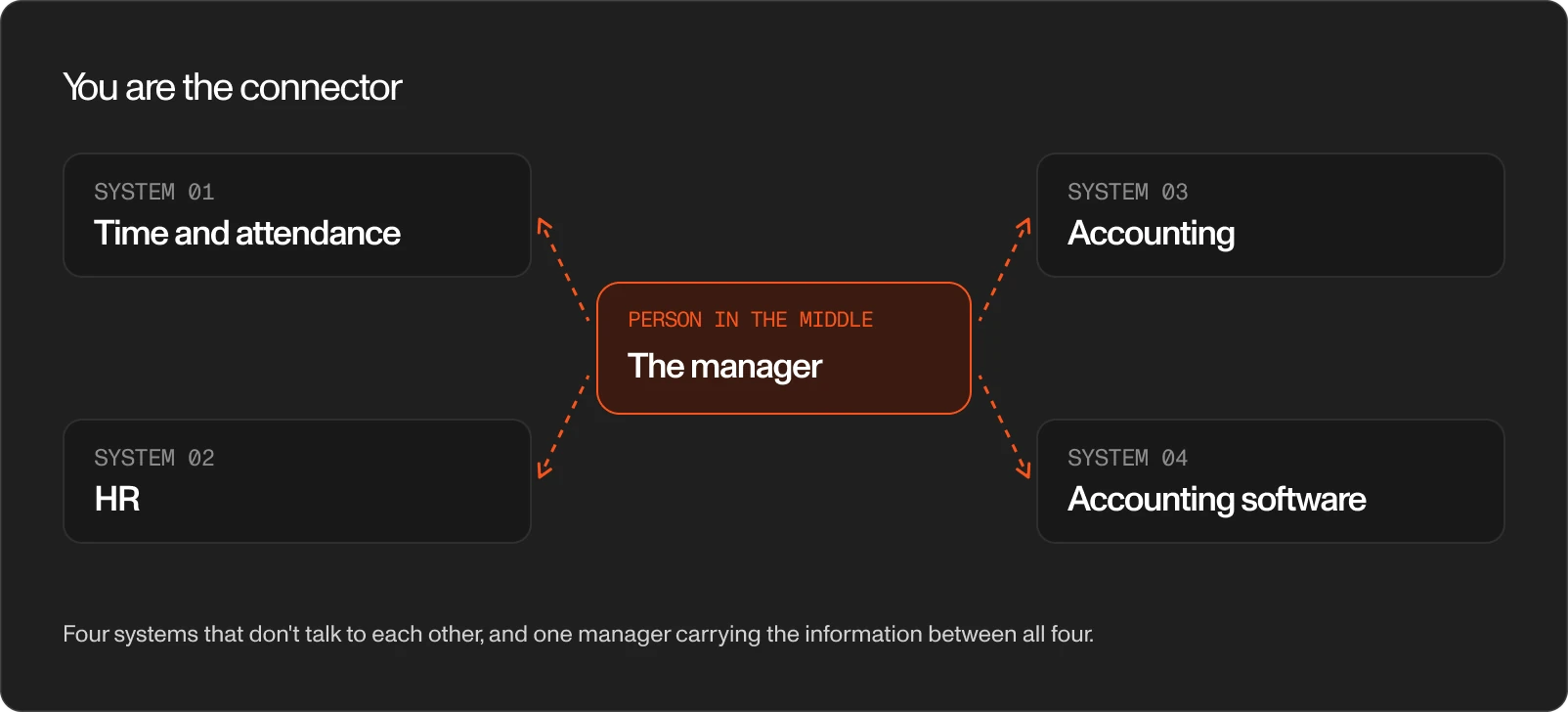
In most companies the connector between systems is a person, usually the busiest one. In an institution with production sites and more than 200 employees, the time and attendance system, HR, accounting and the accounting software didn't talk to each other, and the manager who contacted us was personally carrying information between all four.
Four signs you're losing time
The places where a company loses the most time show the same four signs:
- Retyping, when the same data goes on paper, then into a spreadsheet, then into the accounting software, and every retyping is a chance for an error.
- Searching, when the answer to "who last worked on this machine?" takes half an hour.
- "How far along are you?", when a customer or a colleague has to call to learn the status of a job, because the status isn't written anywhere.
- The late invoice, when a week or two passes between a finished job and the invoice because someone waits for a paper, a signature or an approval, which is money standing still.
Count how much time goes to searching, retyping and calling people. Start where the number is highest.
What to digitalise first
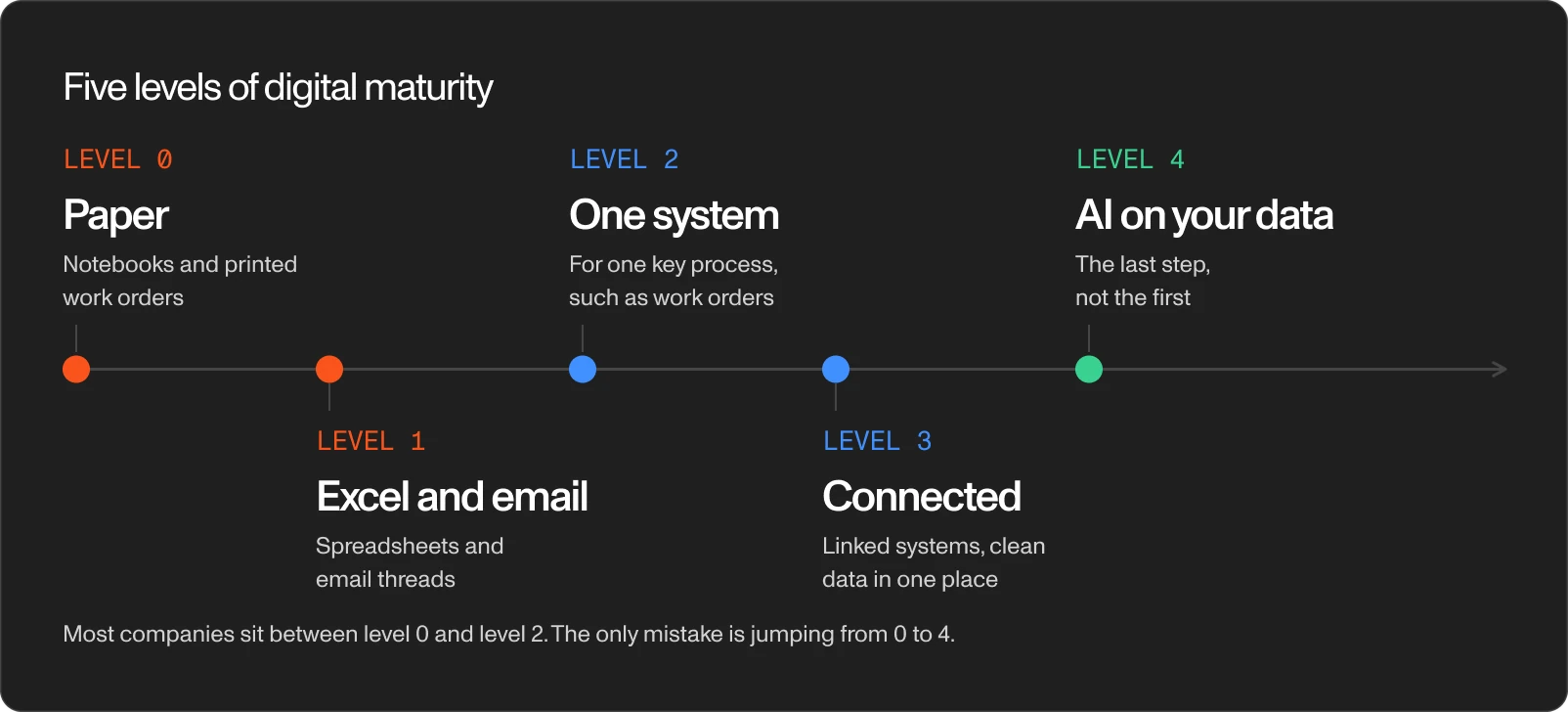
We use a simple five-level ladder for self-assessment. Level 0 is paper, level 1 is Excel and email, level 2 is one system for one key process, such as work orders, level 3 is connected systems with clean data in one place, and only level 4 is AI working on your data. Most companies sit somewhere between 0 and 2, a normal place to be, and the only mistake is trying to jump from 0 to 4.
Predictive maintenance is the clearest example. AI predicts the next failure of a machine, a vehicle or a boat only when the failure history is recorded, work order by work order, and in most companies it isn't yet.
The answer to "what first?" is often not what you came with. The institution from the connector example came to us with a maintenance wish list: a register of machines per site, fault reporting, certificates and service reminders. When we went through what hurt most, it turned out to be the monthly calculation of hours for more than 200 people, assembled by hand from several sources. We started there, and maintenance waited.
The boring foundations come first
Every digitalisation project, and later every AI project, stands on three foundations: a clear process, clean data and people ready for change. When one of them is missing, software doesn't help, and AI helps even less. Digital transformation is as much about managing people as it is about managing technology.
The order we recommend has five steps:
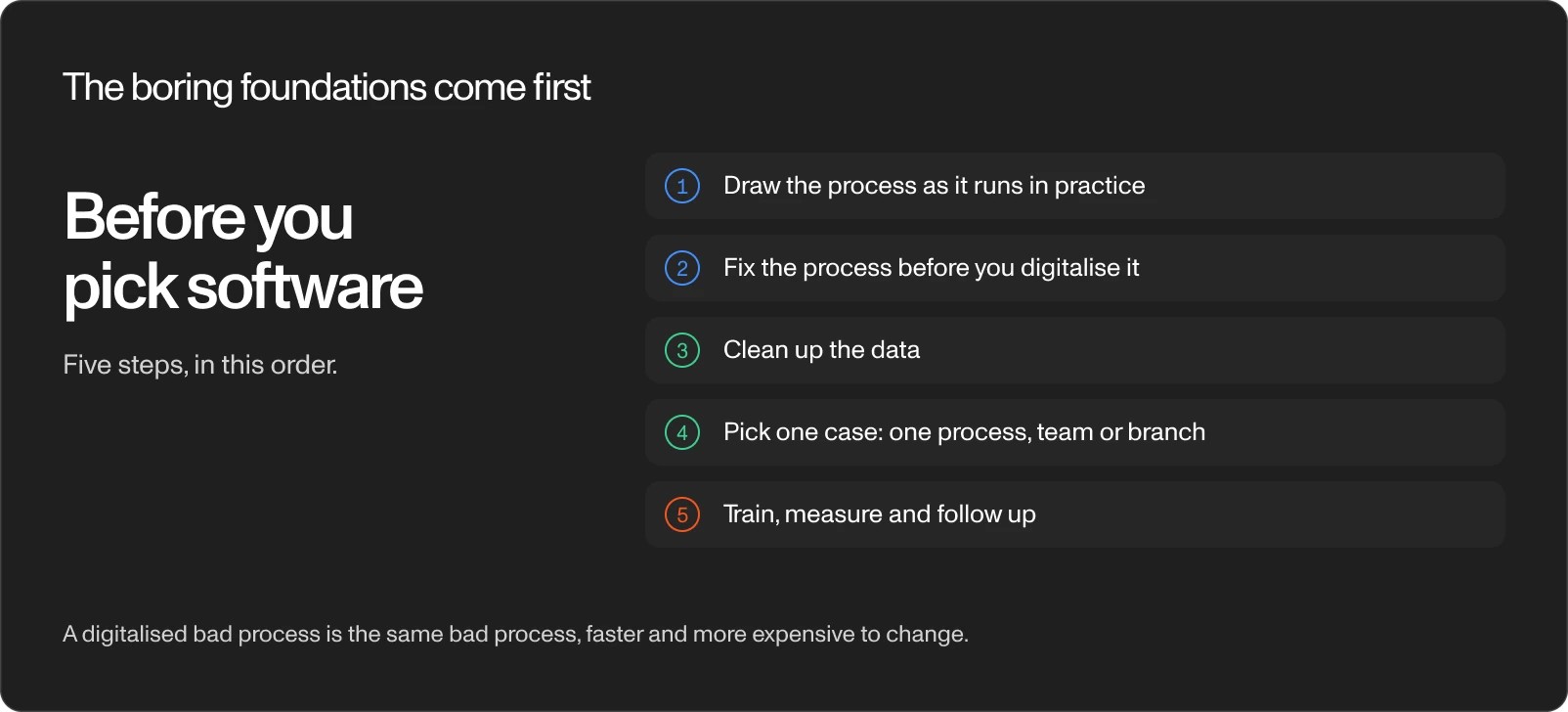
- Draw the process as it runs in practice, not as you think it runs. Do it with management and the people who do the work every day, at the same table, and you'll almost always find the two groups see the same process differently.
- Fix the process before you digitalise it. A digitalised bad process is the same bad process, faster and more expensive to change, so remove the steps kept only because they always existed, agree who approves what, and decide which edge cases stay out of automation.
- Clean up the data. Agree what a customer is, what an asset is, what things are called and who enters what. When the same machine has three names in three spreadsheets, no system and no AI will know it's one machine.
- Pick one case: one process, one team or one branch, and not the whole company at once.
- Train, measure and follow up. Name the person who leads the rollout and decide what you'll measure after three months.
Step 2 often takes one conversation. This month a manufacturing company with a plant and three departments described its timesheet process to us as a "triple check": a secretary entered absences from paper leave slips, department directors reviewed everything without the right to edit and locked the week, and one more person locked the month. After one phone call, department heads edit and lock their own week, finance locks the month, and the paper slip is gone because the absence goes straight into the system. A rule surfaced along the way too: arriving 10 minutes early and leaving 15 minutes late doesn't count as overtime. We hadn't written a single line of code, and the process was already simpler.
When a company says "the system works, so why does nobody use it?", the answer almost always sits in one of these three foundations. At Innovate Split this year Ivan moderated a panel with three companies from three industries, all of which started on paper, and they reached the same conclusion: everyone wants AI, and before AI becomes part of daily work you still need a clear process, good data and people who are ready for it.
Off-the-shelf software or custom software?
Both routes lead to good results, and the choice depends on how specific your process is. Four questions help:
- Does your company work the way most companies in your industry do? If yes, off-the-shelf software likely covers 80% of what you need.
- How many people will use the system, and how many other systems does it have to connect to, such as your accounting software?
- Who owns the data, and will you get it out if you leave?
- What does maintenance cost once the system is finished? Custom software doesn't end at delivery, it has to be maintained for years, and this cost is the one companies forget.
AI now lets someone with no programming background build an app over a weekend. For a prototype and for testing an idea, a weekend app is great. For a key process, work orders, invoices and customer data, think about who maintains the app, where the data lives and what happens when something breaks.
Our advice: start with an off-the-shelf product. Custom software makes sense once you know exactly what you want and what the off-the-shelf product lacks, and you usually learn this only after a few months of use.
What AI is, and why it doesn't fix a bad process
Ask an AI assistant two questions. "Rewrite this email so it sounds more professional" gets an excellent answer. "Have we already written to this customer about this?" gets no answer at all, unless the assistant is connected to your email. The whole gap between general AI and AI working with your data sits between those two questions, and anything not written down and connected doesn't exist for the assistant.

Three pictures help here. AI is a new kind of computer, where the model is the processor, the environment it runs in is the operating system, and the skills and connectors linking it to your email, documents and systems are the applications. Most people only look at the processor and ask which model is best, while the value for a company comes from what the AI is connected to and which instructions it has. AI is also a new colleague on their first day, smart, fast and well informed in general, who knows nothing about your customers, prices or rules until you explain them. And a way of working you write down with AI stays in the company: do one job with AI step by step, correct it until the result matches how you'd do it, ask it to write down how you did it, and add what you know but didn't say. The written procedure keeps its value when you switch the AI off, and it no longer leaves the company with the one person who knew it.
AI is excellent at writing and rewriting text, summarising long documents, searching large amounts of text, first drafts of offers, contracts and reports, and arranging data into a readable form. AI is unreliable with exact figures, with changing regulations, and with anything it hasn't seen, because AI doesn't check, it completes the sentence. Take "The VAT registration threshold in Croatia is…". For a language model, 60,000 EUR, 40,000 EUR and 300,000 kuna are equally plausible endings. Only the first one applies today, the second one applied until the end of 2024, and the third one before Croatia adopted the euro.
An AI agent, in our definition, doesn't only answer a question, it carries out a series of steps on your data and tools: it reads an email, finds a document, drafts an offer and prepares it for your approval.
AI accelerates the direction you're already going in and doesn't correct it. Put it on a bad process and you reach the same wrong answers faster, and the mistakes cost more to undo. A multiplier applied to zero is still zero, and applied to a mess it gives a bigger mess dressed up as progress. The bottlenecks in companies today are rarely technology. They're five levels of approval, responsibility spread over four teams and a spreadsheet as the main source of data, and an agent inherits all of them.
Before AI, check your data with three questions, the same ones an AI audit for a small business starts with. Is it clean, meaning the same thing has the same name everywhere and the records are complete? Is it accessible, meaning a system reads it, rather than a notebook, a paper or someone's phone? And who governs it, meaning who sees what and who answers for its accuracy? The best move for your AI strategy often has nothing to do with AI: it's cleaning up your data.
How this played out in our projects
The examples we showed come from projects at Workspace, and none of these companies started with AI.
- Process: a yacht service company fixed its data model on paper before any code, and now closes every job with one signed PDF.
- Data: a charter company agreed on three rules, and AI now splits regular and warranty hours per boat in seconds.
- People: a security company quit 10 days into training, because its own work organisation wasn't ready for the switch.
Process example: digital work orders for a yacht service company
At a yacht service and refit company, about 15 technicians, mechanics and electricians handle around 150 boats, 350 work orders and 120 customers a year. One service was recorded three ways: the company's paper form, the paper the customer signs on board, and the engine manufacturer's electronic report. Management assumed one boat means one work order, until the workshop manager corrected them: a yacht stays from September to June with five parallel jobs under one order, engines, generator, stabilisers and more, each with a different crew. We ran a workshop with management and technicians and fixed the data model on paper before writing code. Today technicians write the report on their phones every day, the job ends in one PDF with the customer's signature and all hours in one place, and management sees planned against actual hours. In 2024 the same management called moving offers into the app overkill. This year they wrote a 17-page specification for custom offer and project management software themselves.
Data example: who pays for the hours at a charter company
A charter and yacht management company has several branches along the coast. A technician left for a boat without knowing who would pay for the hours: the owner, the shipyard under warranty, or a company inside the group. We built nothing new. We agreed on three rules: a branch is a customer, a boat is an asset and warranty is a flag on the work order, and ran a pilot with two technicians in one branch. Rollout depended on one person, and the system doesn't support access restrictions per branch, which they asked for. Since the warranty flag exists on every order, AI answers how many hours were regular and how many under warranty, per boat, customer and owner, in seconds.
People example: why a security company quit after 10 days
A security systems company with field technicians and more than 20 maintenance customers paid for a trial and quit 10 days into training. Their words: the functionality was satisfactory, the problem was their current work organisation, coordination with technicians and their large database. Another company rolled out mid-season, quit, and came back in winter with 2 users instead of 5. Roll out outside the busy season, with one person who leads it and has time for it, and with data in order before the switch.
The same order for custom software and AI
The same order holds for custom work. An air conditioning service team used an off-the-shelf tool daily for six months, and their list of missing features became the spec for a custom upgrade, which now waits on co-funding. The field service company with 24 steps wrote 34 pages of requirements, priced at almost 100,000 EUR and 9 months of work, a sign to start smaller.
This autumn we rolled out AI in a tax advisory office. Licences took one day, and the rest went into four questions: where the data is, who sees what, who manages the settings, and what the source of truth is for customer data. In our own work, AI prepares the morning overview, meeting minutes, a knowledge base, weekly client reports, first drafts of offers built from real hours of past projects, and contracts assembled from clauses a lawyer already approved. Small agent teams handle prospecting, a weekly blog article and a review of competitors and public tenders, and a person approves everything before it leaves.
Draw one process from first call to invoice
Sit down with the people who do the work, not only with management, pick the process where you lose the most time, and draw it from the first call to the invoice. You'll see where data gets retyped, where work waits and where jobs get lost, and the drawing is the first step toward both digital transformation and AI.
If you use AI in your company, Article 4 of the EU AI Act has required companies using AI systems, since 2 February 2025, to ensure a sufficient level of AI literacy among their staff. For a 30-person company this means a list of the tools you use, an internal rule on which data never goes into public tools, a short training, and a record of the training.
If you want a second pair of eyes on the drawing, reach out to book a discovery session.